
Easy Guide to Create a Google Business Page
86% of consumers use Google Maps to find local businesses, and businesses with a complete Google Business Page are 2.7x more likely to be considered reputable by potential customers.
A strong online presence starts with visibility on Google. For local businesses in Miami, the most effective way to get discovered is by setting up a Google Business Page. This free tool connects your company to customers searching on Google Search and Google Maps.
This guide is your step-by-step playbook to create, claim, optimize, and manage a Google Business Page that not only gets seen but also converts clicks into customers.
What is a Google Business Page?
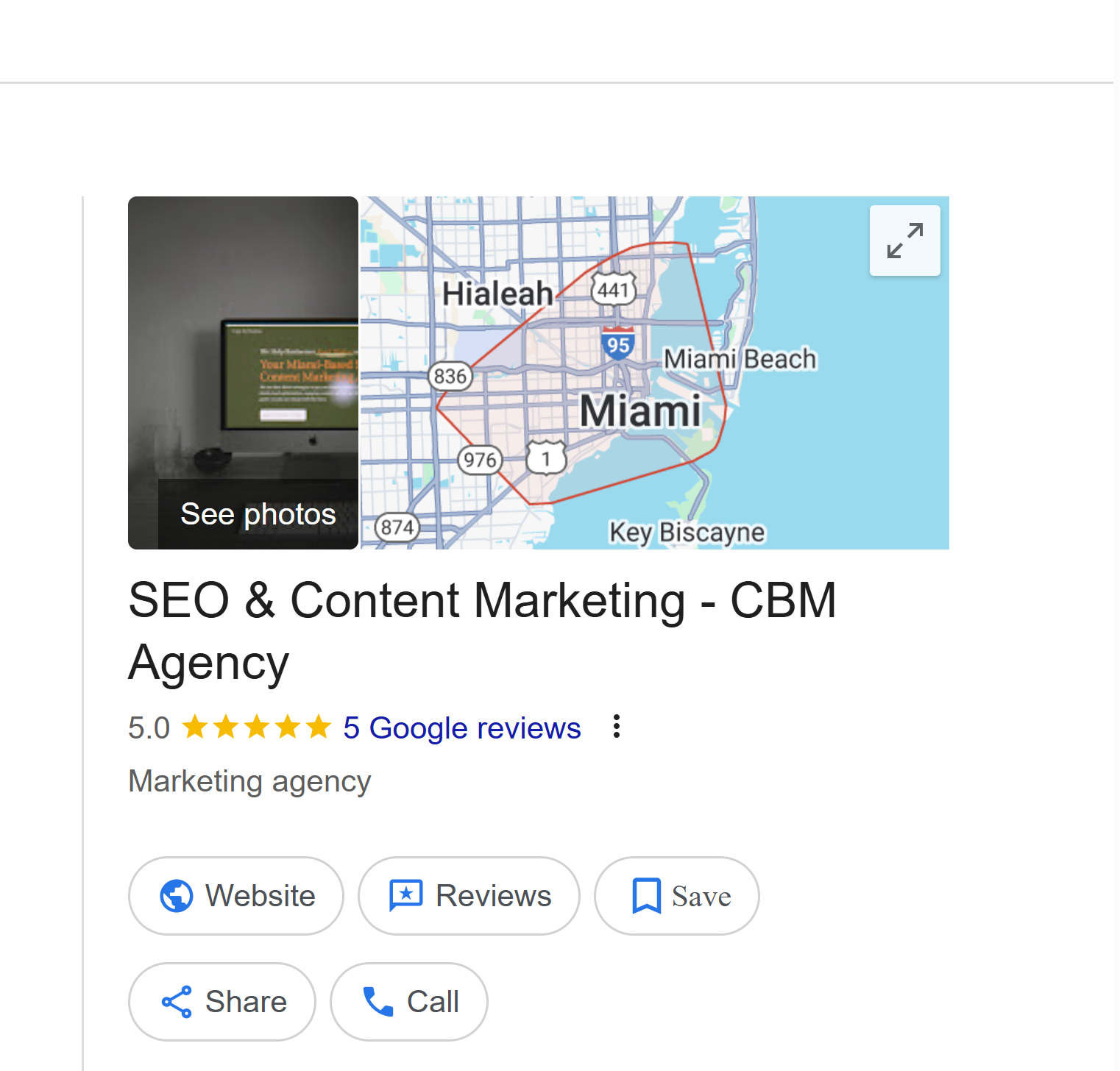
A Google Business Page (also called Google Business Profile) is a free online listing provided by Google. It displays your business information directly in search results and Google Maps. When someone types “best spa in Miami” or “SEO agency near me,” businesses with an active Google Business Page appear in the local pack, the top 3 map listings.
Your profile includes critical details:
Business name, address, phone number (NAP)
Website link
Hours of operation
Photos, logo, and services
Reviews from real customers
Posts about offers or events
A properly optimized Google Business Page boosts trust, visibility, and customer engagement.
Do You Need a Google Business Page?
Yes! Every business, regardless of size or industry, needs a Google Business Page. For CBM Miami and similar companies, this is the foundation of local SEO.
You need a Google Business page for:
Visibility: Appear in the “near me” searches that locals in Miami frequently use.
Trust: Customers trust businesses with updated profiles, reviews, and photos.
Conversions: A Google Business Page drives calls, clicks, and direction requests directly from search results.
Without it, you leave money on the table and make it easier for competitors to take your spot.
Why Every Business Should Have a Google Business Page
Here are five reasons why a Google Business Page is non-negotiable:
Local SEO– Google Business page boosts your chances of showing up in Google’s Local Pack and Maps results.
Google Business is a Free Marketing Tool – Unlike ads, a Google Business Page is free to set up and maintain.
Mobile Search Advantage – Over 60% of local searches happen on mobile. Your page ensures you’re visible to on-the-go customers.
Google Business Page Encourages Customer Interaction – Customers can leave reviews, ask questions, and see updates.
Competitive Edge – With local businesses in Miami competing for attention, a well-optimized Google Business Page gives CBM Miami an advantage.
What Are the Requirements for a Google Business Page?
Before you start, gather the essentials:
Google Account: You’ll need a Gmail or business Google account.
Business Name & Category: Select your primary and secondary categories. Example: “Digital Marketing Agency” or “Massage Spa.”
Physical Address or Service Area: Businesses with storefronts list their addresses. Service-based businesses (like mobile massage in Miami) can list service areas.
Phone Number & Website: Ensure they match across all online platforms.
Verification Details: Google may require postcard, phone, or email verification.
Pro tip: Keep your NAP (Name, Address, Phone) consistent across directories, social media, and your Google Business Page. This consistency builds trust with Google’s algorithm.
How to Create a Google Business Page
Creating a Google Business Page is simple. Follow this step-by-step guide:
Sign In: Go to Google Business Profile and sign in with your Gmail account.
Add Your Business Name: Enter the exact name of your business. Avoid extra keywords.
Select a Category: Pick the category that best represents your services. For CBM Miami, options could include “Business Management Consultant” or “Marketing Agency.”
Enter Address or Service Area: Add your Miami location or select “I deliver goods and services to my customers.”
Add Contact Info: Include your phone number and website.
Verify Your Business: Choose a verification option (postcard, phone, email, or video call).
Customize Your Profile: Upload photos, add hours, list services, and write a keyword-rich business description.
By the end of this process, your Google Business Page will be live, visible, and ready to attract clients.
Is It Free to Make a Google Business Page?
Yes, creating a Google Business Page is completely free. Google doesn’t charge you for setup or listing. The only potential costs involve:
Running paid Google Ads (optional).
Hiring a professional photographer for profile photos.
Partnering with agencies like CBM Miami for optimization.
But the core Google Business Page and all its features are free, making it one of the best ROI tools available for local businesses in Miami.
How to Claim an Existing Google Business Page
Sometimes, Google auto-creates business listings from user submissions or data. If you find a page already associated with your business, you’ll need to claim it:
Search your business name on Google.
If you see “Own this business?” click it.
Request ownership.
Complete verification via phone, email, or postcard.
If another person has claimed your page, you can request ownership. Google will notify the current manager. If they don’t respond, Google allows you to claim after a set period. This ensures CBM Miami or any local business has control over its online identity.
How to Create Multiple Google Business Pages from One Account
Businesses with multiple locations in Miami or across Florida can manage them all under one account.
Steps:
Sign in to your Google Business Page dashboard.
Click “Add Location.”
Enter the new address and details.
Verify each location separately.
Pro tip: Use the same naming convention for all branches. For example:
CBM Miami – Downtown
CBM Miami – Coral Gables
CBM Miami – Brickell
This strengthens brand consistency and improves local SEO
How to Optimize a Google Business Page for Miami
Most guides skip this step, but optimization is what ranks your Google Business Page above competitors.
Local Keywords: Add “Miami,” “South Florida,” or neighborhood names in your business description. Example: “CBM Miami provides digital marketing solutions to businesses in Brickell, Coral Gables, and beyond.”
High-Quality Photos: Upload real images of your office, staff, and Miami landmarks.
Regular Posts: Share updates, offers, or events weekly.
Collect Reviews: Ask satisfied Miami clients to leave reviews with keywords like “CBM Miami” or “business consulting in Miami.”
Geo-Tagging: Use images with Miami geo-tags for stronger local signals.
Q&A Section: Pre-populate common questions and answers. Example: “Do you serve clients outside Miami?”
Common Mistakes to Avoid on a Google Business Page
Avoid these pitfalls that can tank your rankings:
Choosing the wrong category or leaving it blank.
Using inconsistent NAP details across platforms.
Uploading blurry or stock photos instead of real ones.
Ignoring reviews or failing to respond.
Keyword stuffing in the business name (e.g., “CBM Miami Best Business Marketing SEO Agency”).
Stick to Google’s guidelines to avoid suspension.
Tracking and Measuring Success on a Google Business Page
Google gives you insights into how customers interact with your page. Monitor these metrics:
Search Impressions: How often your page appears in search.
Customer Actions: Clicks, calls, direction requests.
Photo Views: Compare your photo views with competitors.
Review Growth: Track how reviews grow month to month.
CBM Miami can use these insights to refine local SEO strategies and demonstrate ROI to clients.
Ongoing Management of a Google Business Page
A Google Business Page isn’t “set and forget.” To stay competitive in Miami:
Update hours (holidays, emergencies).
Add new photos regularly.
Post updates at least once per week.
Respond to every review (positive and negative).
Update services or products as they expand.
Google rewards businesses that keep their profile active with higher visibility.
How CBM Miami Can Help You With Your Google Business Page
Creating a Google Business Page is the first step. But optimizing and maintaining it for maximum ROI requires expertise. CBM Miami specializes in:
Setting up and verifying pages.
Optimizing for Miami’s local SEO landscape.
Managing reviews and customer engagement.
Tracking metrics and delivering actionable reports.
Our team ensures your Google Business Page isn’t just live but ranking above competitors and converting visitors into loyal clients.
Final Takeaways
A Google Business Page is more than just an online listing — it’s your free ticket to visibility, trust, and conversions. For CBM Miami and other businesses across South Florida, it’s the fastest way to show up in Google Maps, local packs, and “near me” searches.
Ready to dominate Miami’s local search? Contact CBM Miami today to set up and optimize your Google Business Page for long-term growth.
FAQs
How long does it take to verify a Google Business Page?
Verification typically takes 3–7 business days if done via postcard, though phone and email verification can be instant.
Can I have more than one Google Business Page?
Yes. If you operate multiple locations in Miami (or beyond), you can create a separate Google Business Page for each branch under one account.
Is a Google Business Page free forever?
Yes, it’s completely free to create and maintain. You’ll only pay if you choose to run paid ads alongside it.
How do reviews impact my Google Business Page ranking?
Reviews are a major local SEO factor. Businesses with more positive reviews see up to 50% more clicks and calls compared to competitors with fewer or no reviews.
Can I optimize my Google Business Page for “near me” searches?
Yes. By adding local keywords (“Miami,” “Brickell,” “South Florida”), uploading geo-tagged photos, and encouraging local customer reviews, your Google Business Page can rank higher in “near me” results.
What’s the difference between Google My Business and Google Business Page?
Google rebranded “Google My Business” to Google Business Profile (commonly called Google Business Page). Features remain the same but with a refreshed interface.
How do I track success on my Google Business Page?
Use Google Business Insights to monitor searches, calls, direction requests, and photo views. Pair this with Google Analytics for a complete performance view.
